We are at one of the most important moments in the powder bed fusion market’s entire history. EOS is on the retreat, retrenching itself in higher-volume industrial systems while dropping its entry-level system, the P110. The EOS M4 ONYX’s success in metal and large space and defense orders has increasingly made polymer a side quest for the firm. Farsoon has improved its reputation but is slowing down of late. The firm seems to be at an impasse, strategically trying to see if it will double down on polymer or use its resources to compete more with BLT and Eplus3D in metals. At the same time, it seems unable to make up its mind whether to focus on growth in China or strengthen applications development and service overseas. It can not do all four of these things well, but not choosing is handing the initiative to others. Sinterit’s Blanco2 system is open. The welterweight is turning to Dye Mansion to resell a complete solution around its entry-level systems. It needs to choose a path between being a lab system, championing the economic value of open systems, or making a specific unit for healthcare, defense, or another vertical. HP is dominant in services but needs another growth engine. Formlabs is trying to build off of Fuse success to enter the industrial market.
Small Time
The overarching leitmotif of the powder bed fusion market in 2026 is small. Formlabs’ growth is too small for it to sustain an IPO dream where it will seem to outsiders like a firm that’s a fifth of Bambu’s revenue and a half of Creality’s. HP is growing well, but its revenues are small compared to its parent firm. Sinterit is much smaller than the other firms. Farsoon is too small to continue to do well all over the world in metals and polymers as metal system complexity increases (and BLT and others give eye-watering discounts on large service orders). It’s hard to run a sustainable business when others seem to be trying their darnedest to subsidize consumer electronics firms. An Apple a day keeps the accountant at bay. EOS went from losing $30 million a few years ago on higher costs to renewed growth, predominantly through metals. HP needs the 1200 to work to break open a new, bigger market. Formlabs needs the X1 to work to give itself a market in industrial 3D printing. The theme for 2026 is small, but for 2027 the theme will be “something’s going to give.” The powder bed fusion market is at a tipping point. With the success of the 1200 and X1, the market could grow by a factor of ten, or the two could battle themselves to a standstill, or they could both flop. This is why I’ve spent days writing what could become a decidedly unpopular post trying to pick apart the X1 and 1200.
Different Concepts and goals
The 1200 is an important system for HP and is meant to open the market much further than it has been to date. The 1200 is an accessible system coming in at $60,000 for a 12-liter build volume, complete with an unpacking station.
The idea behind the 1200 is to make Multi Jet Fusion accessible and easy to use. The system is meant for entrepreneurs, services, and manufacturing users new to powder bed fusion. For existing powder bed users, the compact system could be used to run comparatively rare materials. Or it could lead to more flexibility, keeping one inexpensive system open for orders later in the day or a rush-order system on standby for orders that come in outside office hours. The 1200 is meant to make the market much bigger than it is and get in many more customers. Rather than the several thousand industrial powder bed fusion sites worldwide, the company seems to target the hundreds of thousands of other design and manufacturing sites worldwide. To many, the obvious competition for the 1200 is the X1, but to me this is a completely different system for a different market.
The X1 is Formlabs’ entry into the industrial AM market. With a low price point and big build volume, the firm wants to displace existing industrial vendors in the space such as Farsoon, EOS, and HP. The idea behind the X1 is to take Formlabs’ excellent software experience and overall ease of use to industry. With a compact, value-conscious but large 61L build-volume system, the company hopes to reduce CapEx for users, move them to its platform, and grow into higher-end systems. Over trust and established names, the company will want to show cost reductions, part cost reductions, and efficiency. So Formlabs is trying to be Toyota, positioning itself to enter the Lexus market, while HP is trying to make a Macan that is Porsche enough not to devalue the marque but will spread the volume. At this point, yes, there is a real “two ships that pass in the night, and speak to each other in passing” kind of a feel to this. But this obfuscates a real difference in the positioning and what these two things are.
Positioning and Market
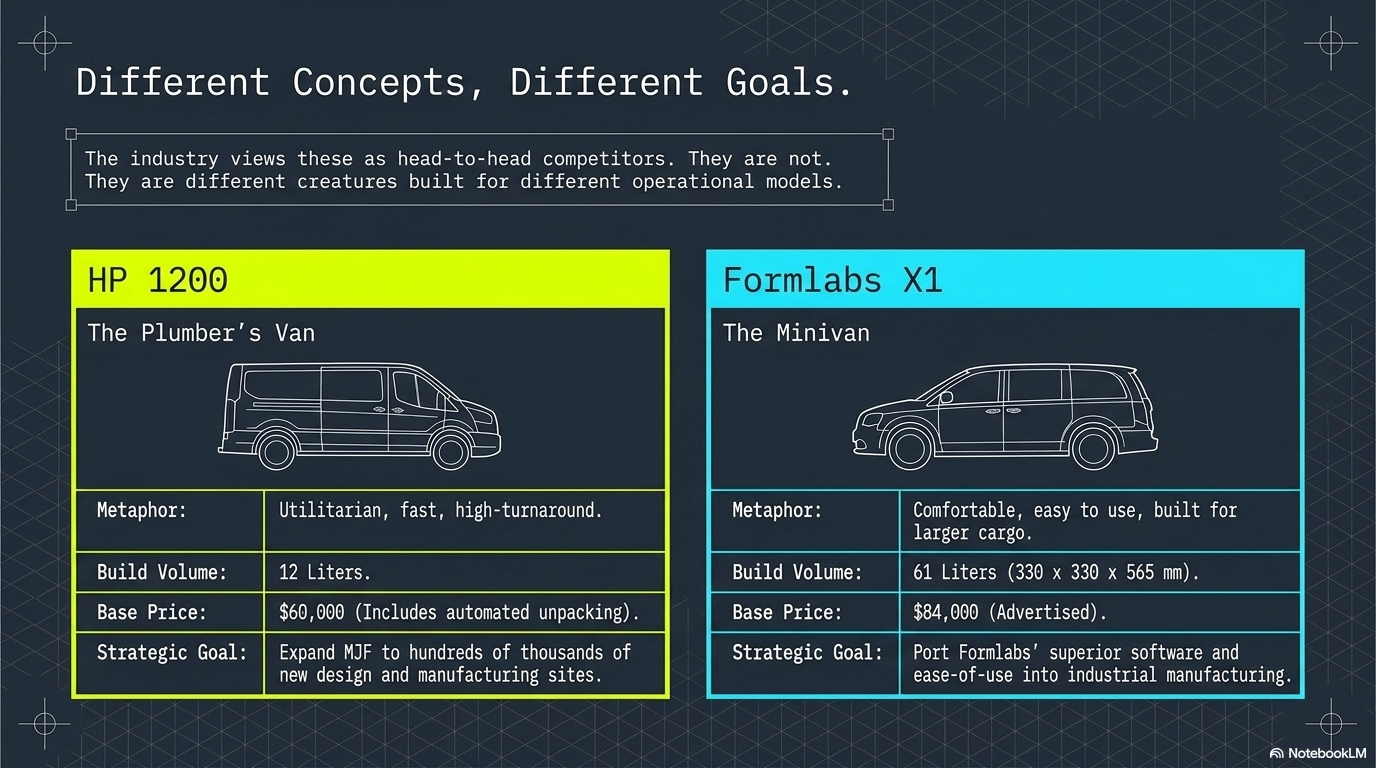
The 1200 is actually supposed to be a Volkswagen Caddy or other small panel van, but I couldn’t get the AI to make that properly.
Now I have a theory that the 1200 and X1 are very different systems indeed. In my Game of Trucks series of articles, I think of the X1 as a minivan and the 1200 as a small plumbers van (Ludospace, Volkswagen Caddy), while the existing large systems are more Mercedes Sprinters. Existing systems are workhorses with premium pricing that last a long time. The Formlabs system is comfortable and easy to use, especially for lower-volume production and large parts. The 1200 can’t do those large parts but will be utilitarian when making lots of stuff. Now I disclose my bias here because I hope that it will help you understand how I look at these systems. And I know that everyone is looking at these systems head to head and will continue to do so. But, to me, they’re going to turn out to be different creatures indeed.
Shark Jumping and other Sports of the Strategically ill-inclined
The challenges are also very different. HP will have to be careful not to make its system and offering too complicated or not to nerf it too much. It will always be fearful of cannibalizing its existing offering, which may lead to it handicapping something that could be much more successful. At the same time, the existing cost structure, sales and reseller-based path to market, and opex generally could mismatch the new offering. See EOS’ killing of the P110, which is akin to ancient times when supermodel Linda Evangelista said, “We don’t wake up for less than $10,000 a day.”

Rendering courtesy of 3DPrint.com/Joris Peels.
Formlabs, meanwhile, wants to prove that it can make a true industrial unit and take its user experience to industry. It has to make a tool, but as a friend of mine says, “the specs are tool-like, but we don’t know yet if it’s a Harbor Freight kind of a tool.” Establishing credibility and reliability as a company, and as per this device, is key for them, therefore. The first Macan could not be a crappy Porsche, but the first Lexus had to be amazing. Electric Ferraris and Electric Volkswagens are therefore completely not the same thing. The risks to either firm are also not the same thing. HP would like this to work, but most of all wants it to be good and not embarrassing. Formlabs needs to be trusted and wants this to be successful.
The X1, the Fuse1 30W Versus 1200
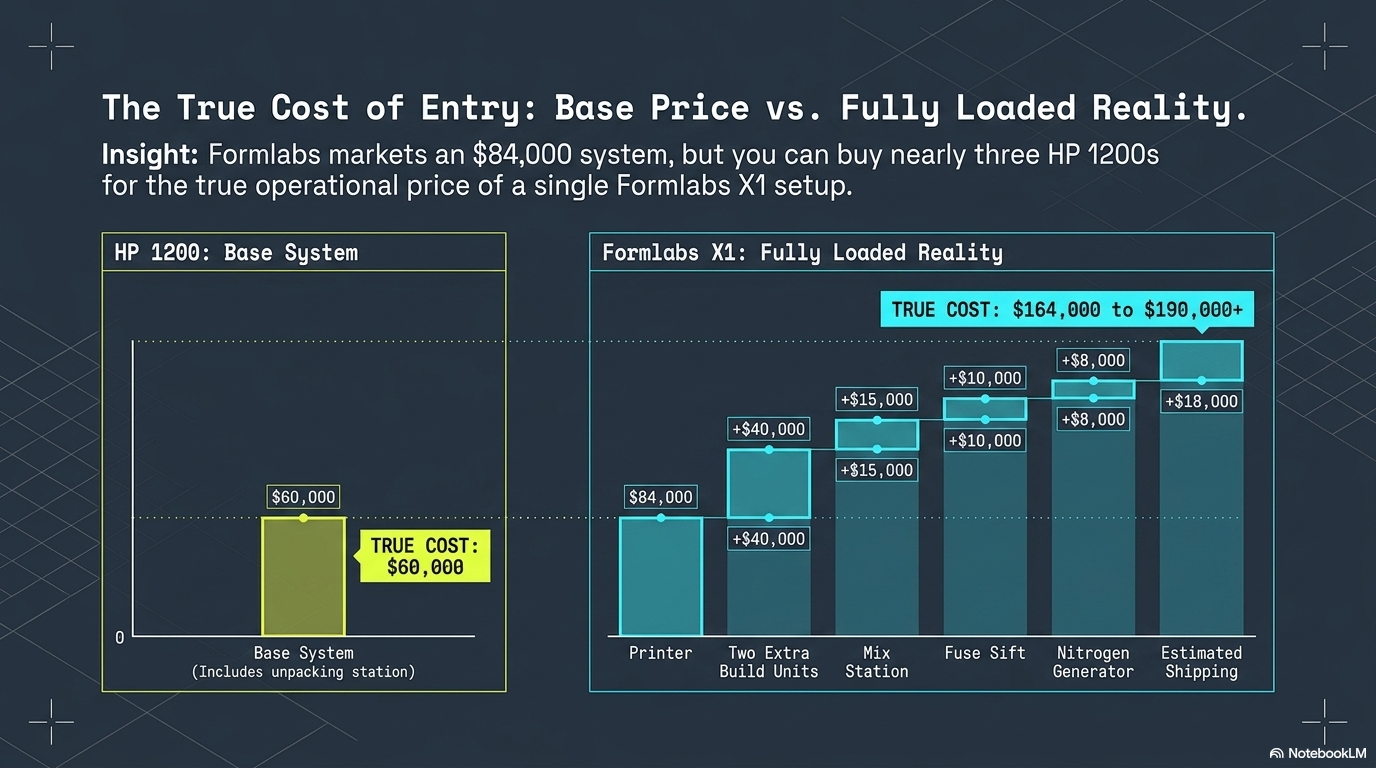
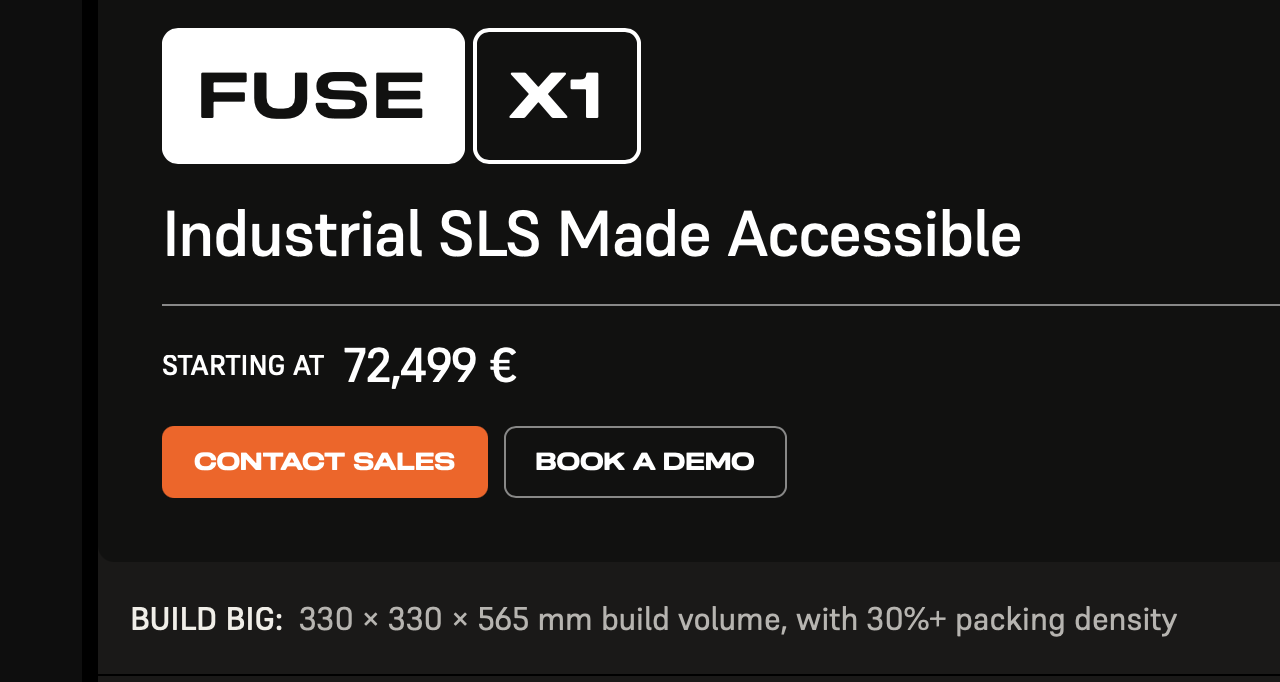
The X1 has a large 330 × 330 × 565 mm build volume (61 liters) and is priced at $84,000. The X1 will require at least an additional build unit and a sifting station. If you’d like to do full builds, which could take 41 hours, you’d need at least two build units (and realistically will want 3?). You’d need a mix station that is around $15,000 as well. Whereas the X1 is being positioned as an $84,000 system, the price realistically is closer to $170,000 to $190,000 for you to get started. I can not tell you the exact price because Formlabs has refused to provide me with the pricing. Formlabs also has not given me the total list of everything I would need to buy to run an X1. I’ve therefore had to ask prospective clients and resellers for this information.
Both the 1200 and X1 have builds that can cool naturally outside the system. The Fuse Sift is now priced at $10,000, and the build units are around $20,000. The Formlabs Fuse 1 is priced at $59,000 including the station. A working X1 will therefore cost at least $164,000 including two build units, a mix station, the Sift, and the printer. Additionally, you’ll probably need a nitrogen generator for around $8000, and shipping charges could be around $18000. Where are they shipping this thing from? I’ve been given different pricing estimates and quotes per region as well, which is confusing. The amount of hidden costs there are quite surprising really. You could buy nearly three 1200s for one X1.
The 1200 demolishes the Fuse1. The Fuse 1 has eight liters of build volume versus the 1200’s 12 liters. The 1200 can also print longer parts. The 1200 is significantly faster than the Fuse 1, taking around two hours less to build a much larger build volume than the 30W and half the time of a regular Fuse1. The build speed of the HP 1200 is double that of the Fuse 1. The 1200 is much more built for production use than the Fuse 1. I’m not sure why anyone would buy a Fuse 1 anymore. This is, to me, the thing that no one is talking about. If you absolutely don’t have the space, then maybe. And, if you already have Fuses or if you want to add a lot more for a farm, then it could be a play.
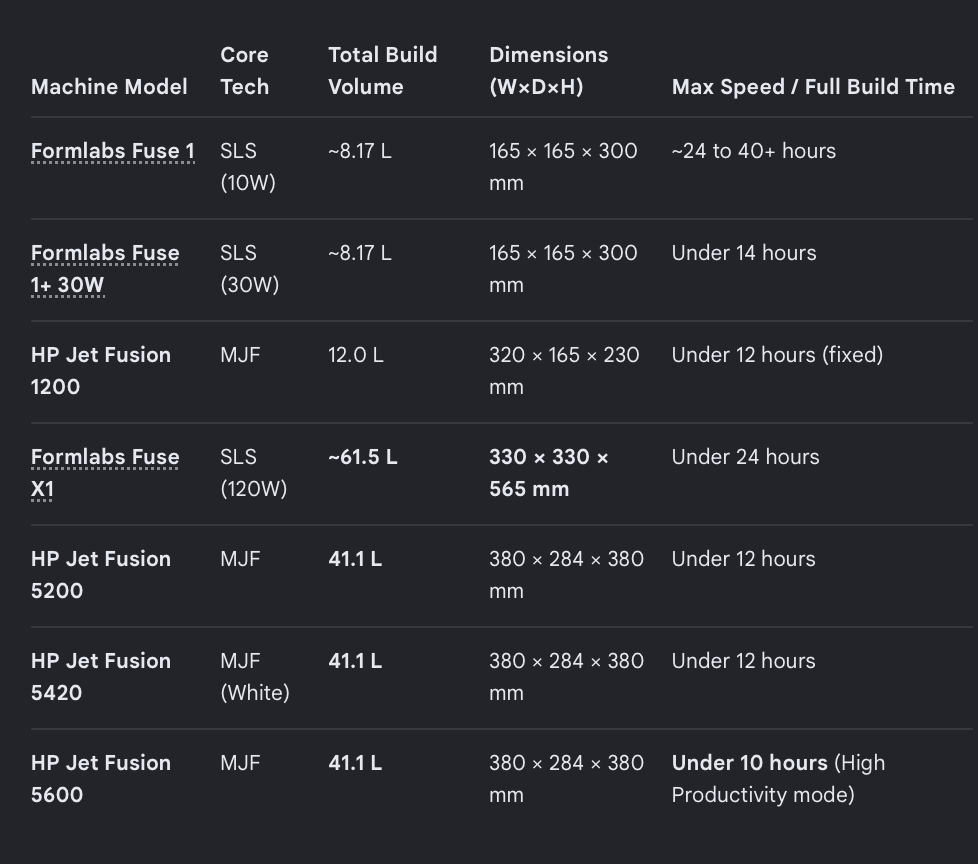
Both the 1200 and the X1 have around five-minute changeover times that could last up to 15 minutes. Both are compact, with both fitting through regular doors. The 1200 is smaller with a significant build volume disadvantage. The build speed of the X1 is half that of the 1200, but the build volume is five times larger. If the X1 prints large parts well, it will be the clear choice for those needing larger parts than fit in the 1200 build. If you need quick turnaround times, need different builds at different times per day, or it’s better for you to print two different materials, then the 1200 is a better investment. The 1200 will also be more flexible and redundant. An X1 will process more parts per batch, which means you have to process fewer batches. But, given the large build volume, it would take around 48 hours for a full build to cool naturally. So, the time to part is much longer with the X1, but there are more parts once you get there. Unpacking on the X1 is manual, while the 1200 has an automated unpacking station. But we will have to wait to see how much labor is actually involved in unpacking and sieving every batch. The labor in the workflows may be different as well. The 1200 comes with Magics, which is nice, but overall I’ll assume that Formlabs does better on software because its software experience is so good generally.
HP will include a service contract which could cost $5000 a year (it’s around 30k for the larger printers, and this feels cheap for them, and I hope they keep to it) while the Formlabs service plan is $20,000 for the first year and $12,300 per year if you commit to five years. The material costs are around $100 per kilo for the HP and Formlabs PA powders. Both will offer volume discounts for heavy users, with HP’s volume discounts ($40) going below those of Formlabs ($45 per kilo). Formlabs told me that they expect most users to pay between $45 and $65 per kilo. With Formlabs, from 1000 kilos you get a 40% discount, and you’d need 10,000 kilos to get a 55% discount. The company therefore expects most users to use over 400 kilos of material, which would give them the 35% discount needed to pay $65 per kilo.
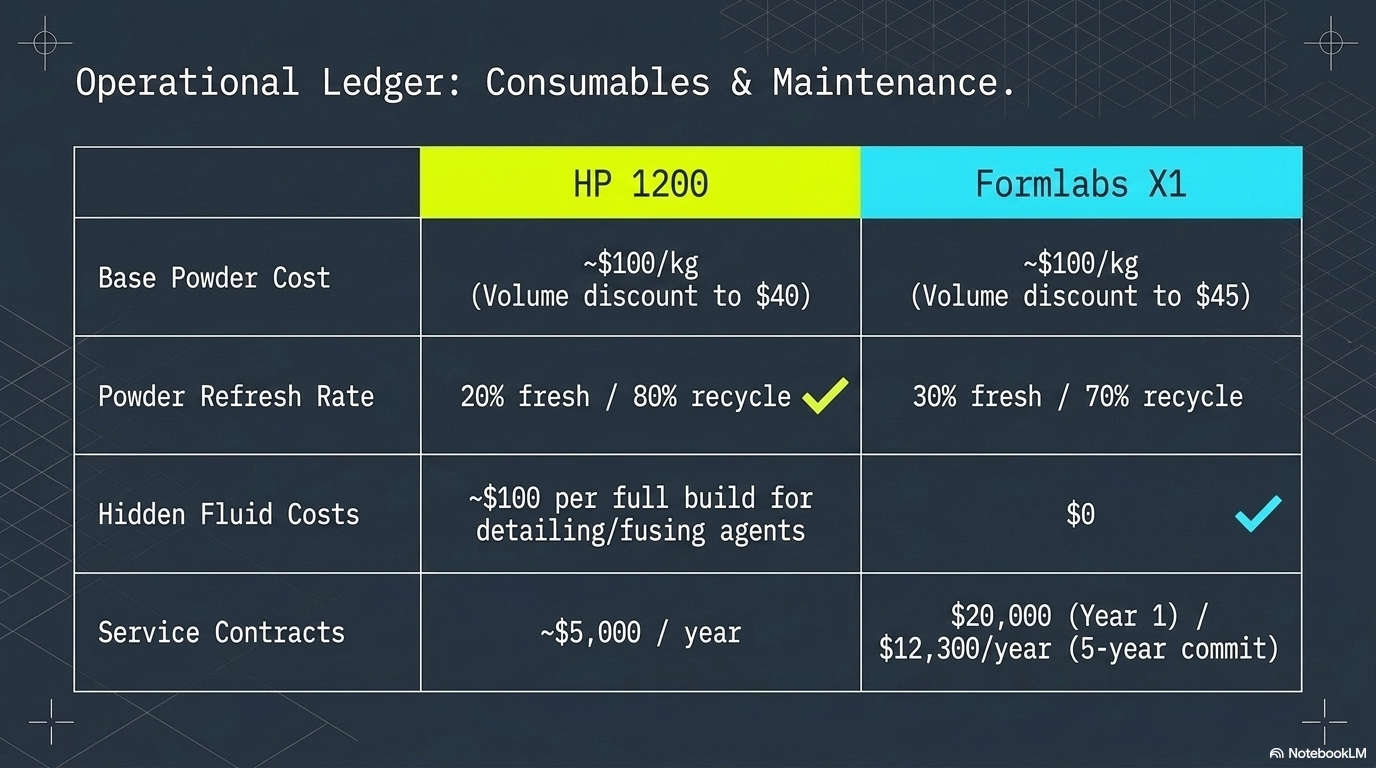
The refresh rate for both printers is different. The Formlabs has to use 30% fresh powder per build and 70% recycle, while HP can use 20% fresh and 80% recycle with High Reusability PA. This will be a significant advantage to the 1200 over time. HP requires extra fluids with the detailing and fusing agent, adding around $100 per full build of parts; this is a disadvantage for HP. Turnaround times seem good, but there are build units to be bandied about, which could lead to more time and more floor space if you do a lot of production.
Sifting Through the Numbers
But, in a crucial difference, sieving and unpacking is manual on the X1. According to Formlabs’ own estimates elsewhere, this may take 15-40 minutes of manual labor per build. The company told me that it thinks it will take 20 minutes. According to users, however, it can take as much as 2 to three hours for a user to manually unsift a Form Fuse 1. Other users say that it takes one to two hours on a Fuse 1. This is the major flaw in the X1. Now it’s probably not realistic to assume that it will take seven times as long to unpack an X1 since this will vary enormously. But if we assume it will take around three hours of manual labor (which is very conservative), then this is an additional labor cost. On the 1200, the unpacking and sifting is automatic. If the X1 would take four to five hours to unpack, then the system will not fare well against the 1200 for people building a lot of parts. But for big parts, it could be much easier and faster. But even a shorter two-hour manual labor time changes the economics a bit. One Formlabs X1 could build 15 kilos of parts in 41 hours of build time, which is what it would take to build an entire build volume. Labor costs would add at least $105 per build (assuming $35 per hour, which is average for many professions but certainly not for some Lockheed dude or dudette) or around $7 per kilo for each Formlabs X1 build.
I see this as the real Achilles’ heel of the X1 for now. In production, this is a weakness. But the company could solve this through an automated unpacking station or a partnership with a post-processing firm. The X1 could be strong in corporate design and development labs, and here the true labor rate of the people sifting is going to be much higher. At the same time, it’s also going to get real annoying real fast. And if it takes five hours, then that would be $175 a build. So the main competitive pressure will be on the price of the agents on the one hand and the post-processing on the other hand.
Blast
The market could therefore be decided by DyeMansion, RusselFinex, AM Solutions or Zhejiang Top if they offered an inexpensive unpack-to-sieve and recycle unit. That, along with one of these printers, could really be the deciding factor, especially if you could easily upgrade it or expand it to cover multiple systems. Material turnaround times on the Fuses are up to a day. So here again, versatility in materials will make quite a difference. For a service likely to use more materials, the 1200 would be more efficient, whereas fewer builds with the same material point to the X1 being easier.
If you’d be likely to buy more of these or want to use them very intensely, the broader market may offer the key solution to reducing part count. Formlabs therefore could sell less post-processing equipment than it intended if DyeMansion offered the perfect compact “hot cake to resurface” machine. But this reduction in revenue would be worthwhile because it would reduce part costs for its users. At the same time, Pre-IPO this would be a threat, but post-IPO this could be the key to long-term growth. Strategically, therefore, partnerships will matter much more here than they have in the past. The future of competition between the X1 and 1200 will, in my opinion, not come down to either firm but how well the broader ecosystem responds to this development. If they see and can make devices that extend the functionality of these devices and help them lower part cost, then they can as much determine the success of these firms as the two main players can. Forget the machines, can someone just come up with a thing that I can dump a hot build into and that then sieves and tumbles them? Wouldn’t that be the key to this market?
Packing Density
Packing density is geometry-dependent and depends a lot on the type of materials, parts, and build. Formlabs routinely claims packing densities of 30% and contrasts them with EOS and HP packing densities at 20%. Packing density depends on parts, part geometry, and wall thickness. Heat crossover effects and packability determine packing density. The types of jobs and parts that your industry makes determine this as well. Traditionally, packing densities across technologies have hovered around 10 to 15%. Formlabs maintains that its Surface Armor prevents orange peel while its Adaptive Temperature Control precisely keeps powder at temperature. The firm says that “Formlabs PA12 chemistry is specifically designed to maintain a low refresh rate, agnostic of pack density” and “a nitrogen environment, which prevents oxidation from powder aging.” The company maintains that “our print data shows that many Fuse 1/X1 customers exceed 30% volumetric packing. So we were comfortable using that as a benchmark. However, ….legacy SLS vendors do not publish packing data or make any public recommendations, so we had to rely on customer accounts to choose a comparable benchmark, and 20% emerged as a typical ceiling.”
I’ve asked 6 independent service bureau operators to give me reliable data on this. For all, 10 to 15% is a regular experience. The three operators that use Fuse 1 systems do not do builds that get 30% packing density. One avoids them due to increased print time, while the others simply don’t encounter them as part of their day-to-day. One user maintains that due to the dark-colored powder, yellowing will not be visible, but that there is a noticeable degradation in tolerances and part quality with higher packing. Generally, all the users believe that tolerances and quality will suffer. Another user mentioned Formlabs’ aggressive marketing but that he’s never seen anything near 30%.
There are several options, therefore. Either Formlabs truly has a distinct advantage in packing density. Now, if this is the case, is it a real advantage? If I pack parts to 30%, to what extent will part properties and tolerances suffer? For what will these parts be suitable? How long will it lengthen builds? And for what kind of parts is this doable? For like big fat parts, and few of them, there may be an advantage? So we don’t know how applicable the packing density advantage is for Formlabs customers.
Is this if Samsonite were saying that you, on average, fit 400 things in your suitcase and Tumi assuming that people take 200 things. And then Samsonite claiming that its suitcases are twice as efficient as Tumi’s. Are they more optimistic in their assumptions? Or is there an applicable distinct advantage? Or is there a theoretical advantage, but in the everyday use of the X1, no one will practically hit this advantage?
This packing density number, however, profoundly impacts cost calculations. Worryingly, if you ask Gemini or other AI agents to drill down into cost calculations of the X1 and 1200, the results are often incorrect.
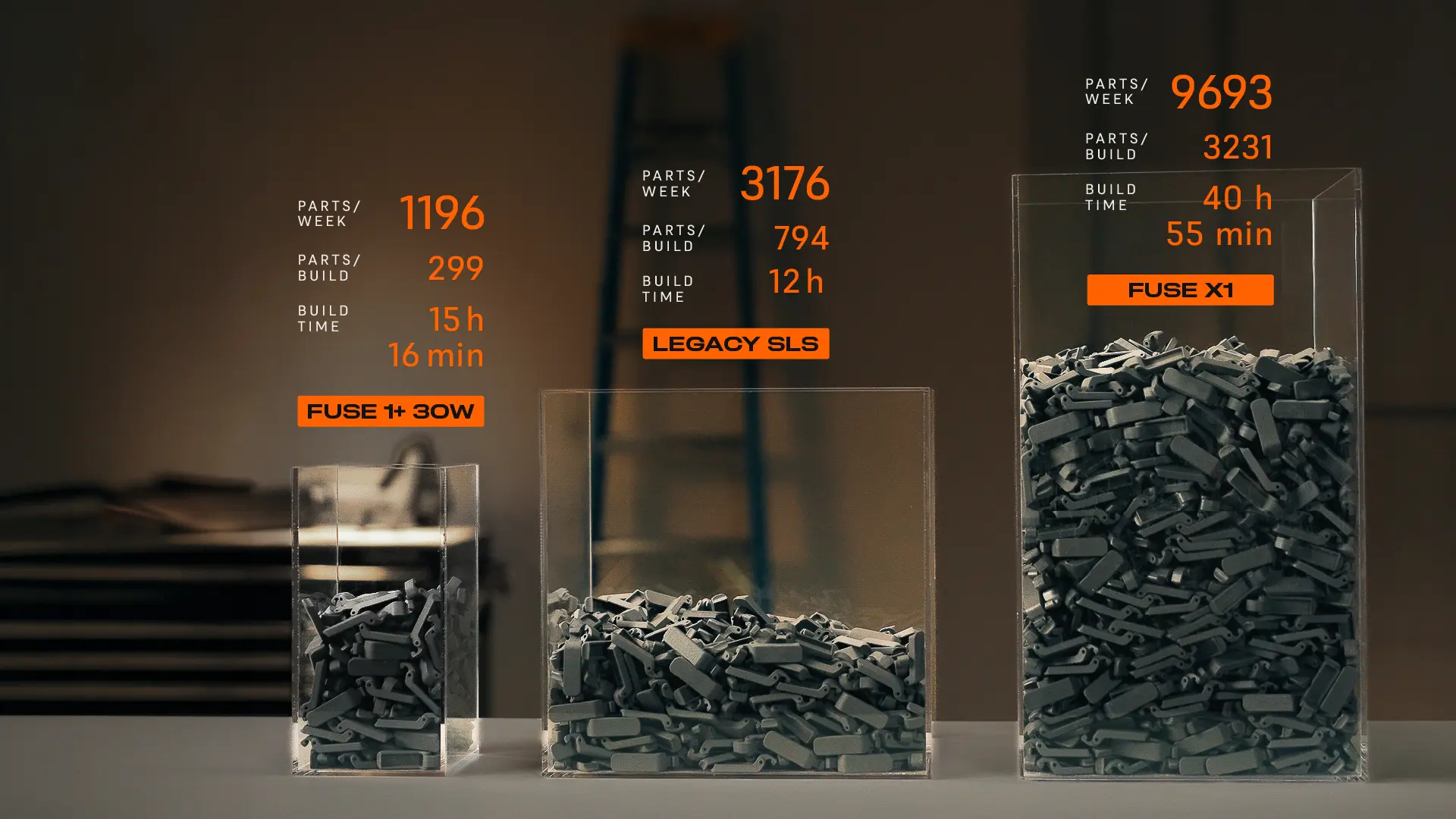
Am I the only person in the world who doesn’t understand this image?
The logic behind HP using a 10% packing density in a lot of their calculations is that for a material with a 20% refresh rate, this leads to a reduction in the amount of material thrown away. EOS uses a conservative packing density in some of its calculations because for its material refresh, that is the optimal point to reduce material wastage. It’s also traditionally completely achievable to get 10% for most users in most conditions. All users asked consider 10 to 15% to be typical.
And if you optimize your packing density for that refresh, you waste less material and increase efficiency, while retaining properties. There has to be space in between parts, and with all powder bed fusion systems, parts can fuse. But this is one constituent number in packing density as a calculation. Optimizing for the refresh rate and things like powder aging and the types of parts that you are making will result in different packing densities all the time.
Throughput
The throughput picture is a bit more complicated. It doesn’t help that most of the online calculations are incorrect. The Fuse 1 30W builds a 7.5-liter build in anywhere from 12 to 20 hours at between 300 ml and 600 ml an hour. The 1200 is around 12 liters and always takes 12 hours at one liter an hour. The X1 takes 40 hours to build and can build at a rate of around 1.5 liters to 2.2 liters per hour, realistically for a mix of nested parts. In the case of a single large socket, it can build at higher rates, around 2.7 liters per hour. Larger systems such as the HP 5600s could build at 3 liters to four liters an hour, while the EOS P3 builds at 5 liters an hour.
Please note that for full builds Formlabs uses 40 hours when they show parts or talk about part volume, but at all other times consider 20 hours a full build. The firm told me that for a dense build it expects the X1 to take 30 hours and that “most large builds take under 24 hours.” This depends on a lot, but I wanted to give you the range.
Cooldown time on the Formlabs X1 will be around the same time as a build. The main issue with the X1 is that at a 40-hour build, you can only do so many per week. The number differs on your shifts and planning, of course. But for most people, three builds a week would be the max; indeed, for most, two full builds will need to be supplemented by a half build for it to work, and the time to part is extensive when you do a full build. 40 hours plus 40 hours means that if I start a build at Monday 9 AM, its ready and cooled at Wednesday five in the morning. Now, for lots of big parts, this is fine, but since the 1200 builds in 12 hours, you can run many more of them.
Each system is made to push out builds and start a new one. The X1 is our weekend warrior, and over the weekend, the system would be great. But with the X1, 4 print runs are the maximum: an entire week and two during the week, with cooled builds being available later. So it would depend on what you’re counting: the number of parts I can make a week or the parts I have effectively available.
The 1200 could do something like 11 runs a week and would make around 57.16 kg per month. The X1 at 30% packing would make a maximum of 226 Kilos a month (realistically it’s probably around 25 kilos a print and 200 kilos a month at 41-hour build jobs but on a multi-shift rotation) of net parts. But at 10% packing, the X1 would produce 90 kilos a month. This would be less than two 1200s, which would cost 120K versus the X1’s 180,000. Now, this is a bit of an imperfect estimate because people will do things like one full, one half, etc. Alternatively, you could also do a 22-hour build on the X1 with 10% packing and extract around 7 kilos of parts. This would get you around 90 kilos per month, But, here again the X1 doesn’t win at 10% packing. But, at 30% packing you’d need 4 1200’s for one X1, and this would be more expensive for the same volume.
A Different Way of Looking
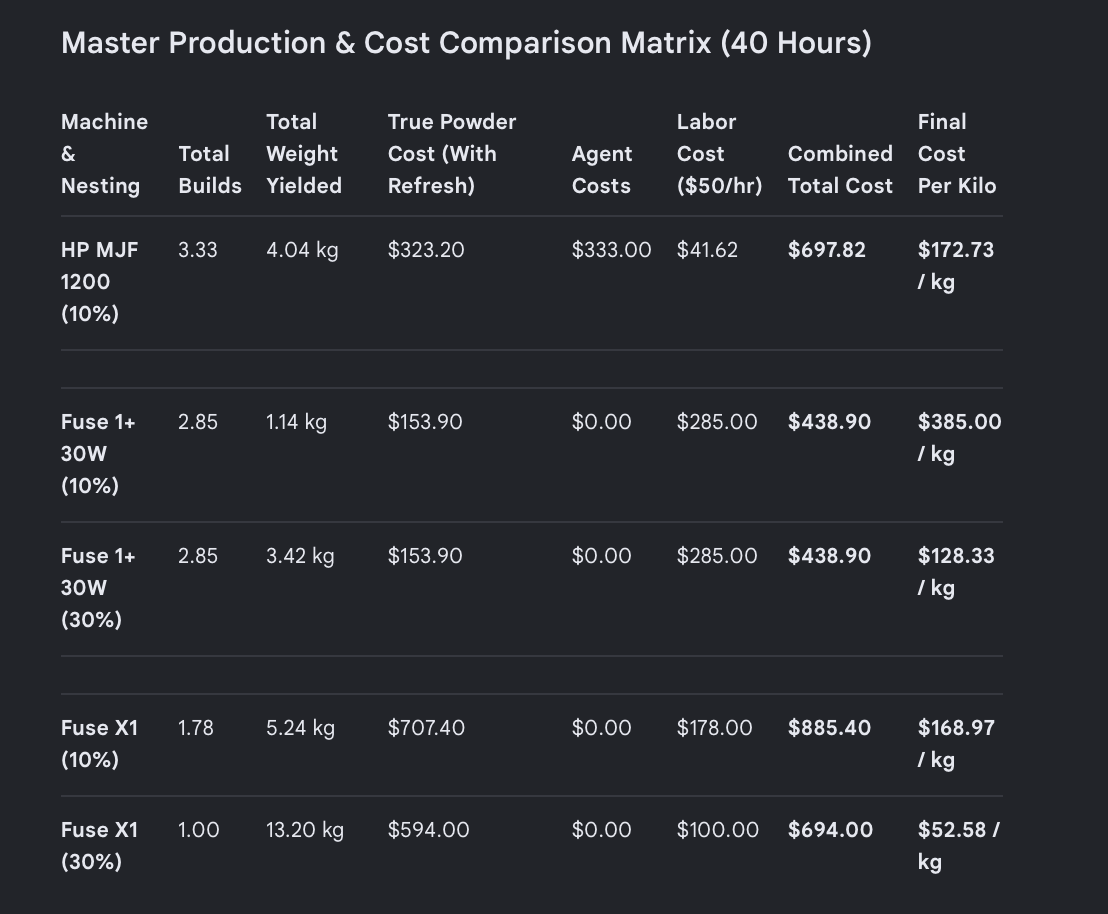
With MJF, the build job time is governed by the number of layers, while the laser dance of the X1 can change build times. Generally, however, we can see that in a 40-hour window (and at 10% packing density for both), a 1200-round run three and a third builds while the X1 would run one. The HP machine would produce around 4 kilos of parts while the build would have to be turned around 3 times (3 times five-minute turnaround, 20 minutes automated sifting, refill). The X1, of course, would require much less labor on the turnaround. It would then take two hours to sift, adding costs. But you’d have 5.2 kilos of parts in the end. Then we’d add the labor for the turnaround times for 1200 turnarounds, the cost for the agent, and the actual cost of the powder. Then we can see that the cost is within 2% of one another. And this is what I believe to be a realistic scenario for most people. If we use these numbers, the X1 is much more expensive than two 1200s, has no part cost advantage, would require more manual labor, and two 1200s would make significantly more parts. So it only really makes sense if you need bigger parts. But if you assume the 30% packing density for the Formlabs machine, the picture looks very bright for Formlabs.
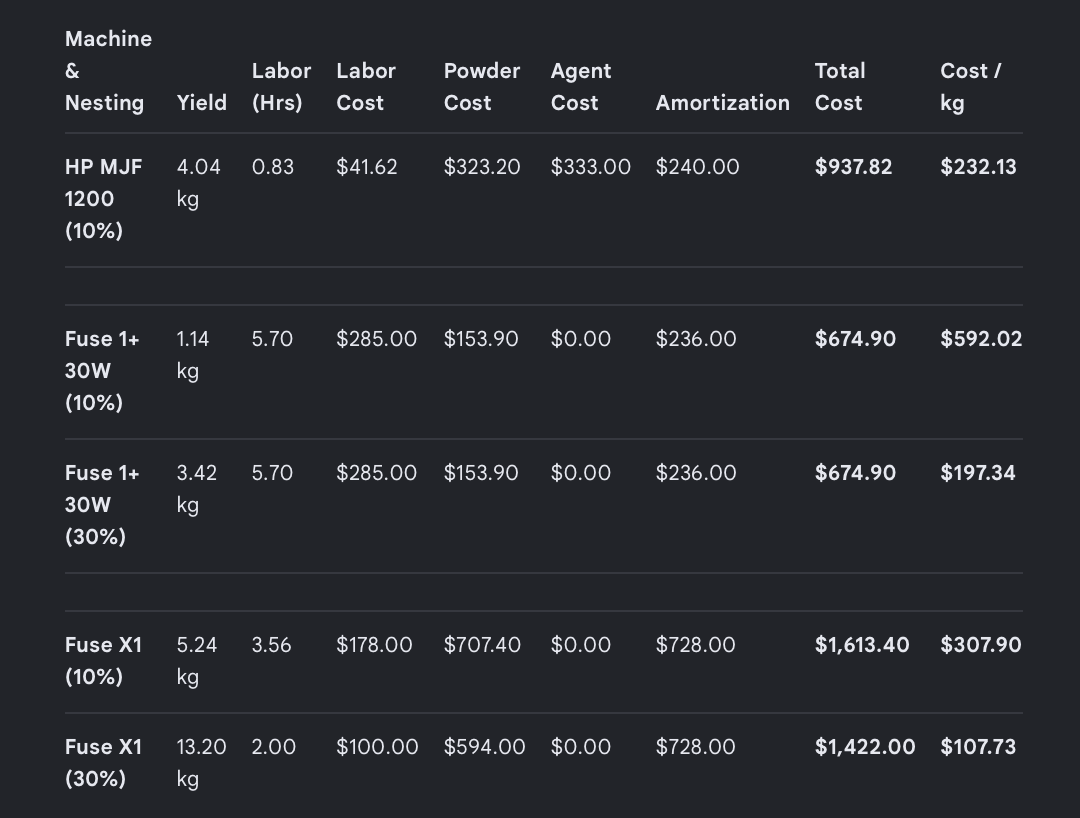
If we add in amortization, we can see that the 30% packing density machine still looks good. But if we look at a 10% across the board, the situation differs. The X1 still makes the most parts and, of course, would be better for large parts. The machine could also be built unattended over the weekend, for example. But the part cost on the 1200 would be significantly better, a third better than the X1. The up-front investment would also be in the 1200’s favor, as it costs a third less.
OK, so let’s look at it again slightly differently, but assuming a multi-shift company and assuming we want to invest around $500k. I’m going to assume here that we’re sharing a Shift unit and a mixer. This would lead to three X1’s and 8 1200s.
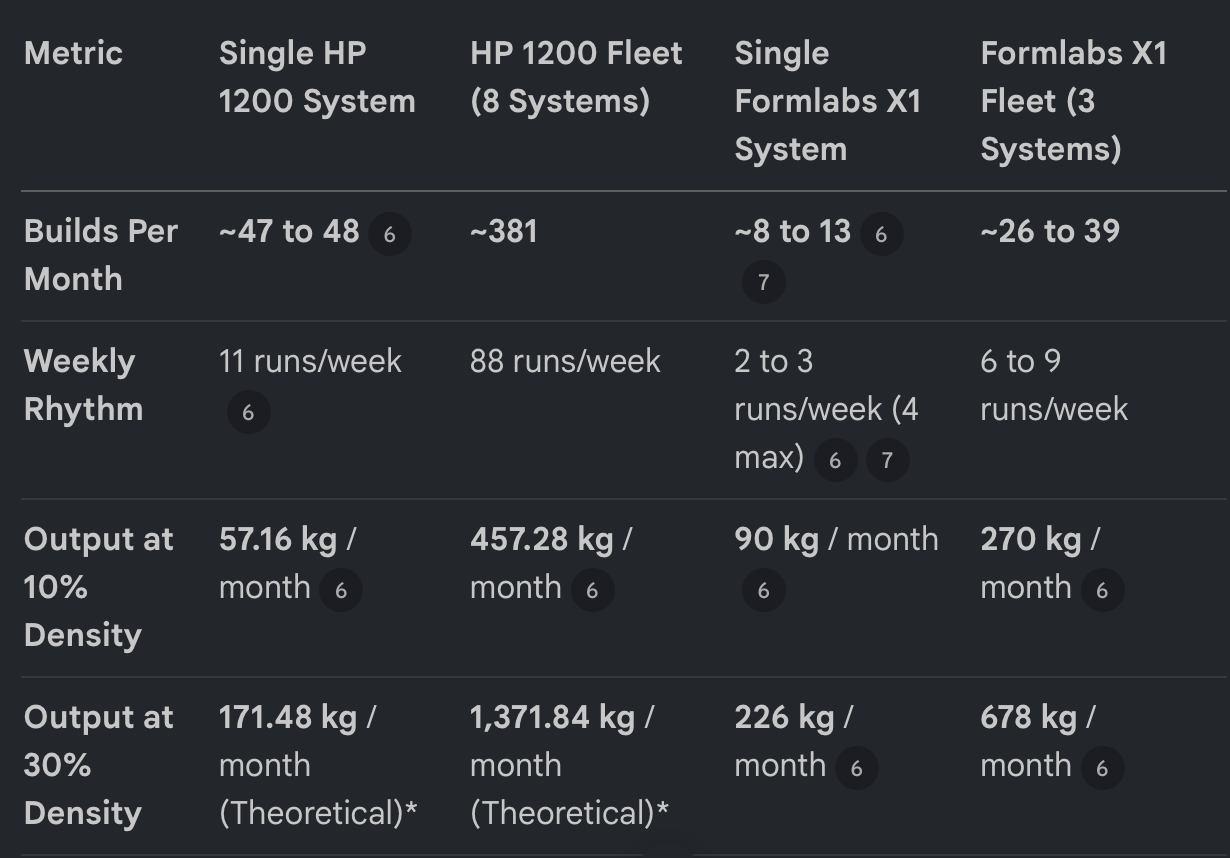
Now, of course, I’m not sure anyone would ever do this, but it changes the yield and usage significantly. This example shows us that it would really depend on the setup, shifts, and material mix we have. For $500k, you could conceivably augment a service bureau with lots of different materials (if HP ends up offering them) and have a very versatile product mix to add on to a PA 12/PA 11-based service. Imagine you then had 5 full-sized MJF units for PA 12. It would be super cool to then throw in a Stratasys SAF to work off of the recycle. And then two X1’s for long, inexpensive overnight and weekend builds of PA 12 and a Farsoon Flight for an FR material that works for your special rail customers (Luvosint PPS?). This, to me, completely changes the economics of running a service. It’s a bit of a Frankenservice, but if we were being honest, and if it were easy, this kind of thing would radically change the economics of getting parts out the door.
30%
Now, if we can build parts at 30%. If we don’t care much about mechanical properties. If we don’t mind that tolerances are a bit all over the place. If we don’t mind that our powder will rapidly degrade. If we don’t want to make end-use parts or need form, fit, or strength, we can build at 30%. And maybe this is an advantage. Or if Formlabs has managed to do some innovation that allows them to produce parts at 30% packing, then this can be an advantage.
So 30% packing may be an advantage; this advantage could be applicable if it indeed works without aging, oxidation, etc. And if the company can maintain the same part strength and properties as others can at 10% when building, then this advantage will in fact be a real one. Is Formlabs saying that at a 30% packing density it can produce parts with the same mechanical properties as an EOS system producing parts at 10%? What kind of mechanical properties can Formlabs get at 30%? It should be fairly straightforward for a University somewhere to test this.
It should be simple to build a bunch of coupons at 30% packing density on an X1 and then compare part properties to those made at 10% on an EOS and HP system and see if properties, strength, and the like are similar. Because this is, in fact, what Formlabs is telling us. The company is implying that it can produce parts with the same mechanical properties, dimensional accuracy, detail level, tolerances, fatigue strength, Young’s modulus, part strength, hole sizes, ovality, without warp and orange peel at 30% that others can make at 10% packing density. All of its calculations are built on this; all of the information that it is giving the public is based on this. I have no reason to doubt them and look forward to the research.
Different Markets
To me, if you make big parts and do few of them, the X1 is a good choice. If you can do a lot of Sketch mode parts, then it would also work. If you do a lot of overnight builds, it could work well also. If you make a lot of parts, if you make small parts, if you want productive builds, then a 1200, or indeed a few of them, is probably a better choice. In a service bureau, a few 1200s could give you a few materials on small, inexpensive printers, expanding your product line on the day. An additional X1 could let you build larger parts overnight or, inexpensively, have an over-weekend build option for a material. For things like pediatric or some adult prosthetic sockets, the X1 may be a very good option as well. But a series of smaller hand braces or mouthguard types of parts would work better, faster, and be cheaper on a 1200. For universities, a large system could make parts inexpensive for some models in the architecture school but may not help anyone in Mechanical Engineering.
At the same time, for product designers, either system may enable certain well-designed parts to be made that would be cheap and functional. For entrepreneurs who want to do high-value goods, the 1200 would be your best bet. The detail would tend to be better on the 1200. And for entrepreneurs wanting to build flexible custom part design businesses, the 1200 would work best. For prototype shops in companies, large parts could be very cost-effective on the X1. Whichever would be best would depend a lot on part size there. So to me, the two printers are very different for very different applications and markets.
Conclusion
I didn’t set out to write a 5000-word article comparing two 3D printers. I definitely didn’t want to write an article that could get one or two big companies in our industry mad at me. I knew that this was one of those impossible-to-win kinds of things. But I was shocked at the paucity of information out there. And with LLMs feasting on imperfect information, many people would end up getting the wrong calculations.
I’ve spent rather a lot of time gathering all the data and trying to compare these two systems honestly. I’m not saying that what I have here is completely correct. It is, however, an honest effort to get some estimates and give people an idea of what they’re getting themselves into. If I get more or better data, I’d love to update these numbers and look at them again. I’d love to look more exactly at turnaround times, sifting time, how many runs, part properties, part costs, packing density, refresh rate, refresh versus packing, and the rest. How much time it would take to sift an X1 build is a super important data point, and I need to learn more about agent cost in MJF builds. So definitely, if you’re running X1S and 1200 when the time comes, reach out to me to share any data. And if you spot any inaccuracy or data point that I should change, please email Joris@3Dprint.com so that I can update it or write a newer article. I wanted this to be a jumping-off point for your calculations and hope that this article is helpful to you. And if you’re a university wanting to compare the part properties and mechanical properties of parts off of these machines at different packing densities, I’d love to be kept in the loop.
Subscribe to Our Email Newsletter
Stay up-to-date on all the latest news from the 3D printing industry and receive information and offers from third party vendors.
Upload your 3D Models and get them printed quickly and efficiently.